
A points system that lasts until June.
LinoClass was built for ages 5 to 8. In Grade 3, what teachers come for is the points, the privileges and the activities, with a class feed families read without an app. Here is what works, and what stays designed for the younger ones.
Free for up to 35 students · no credit card · 15 minutes to set up
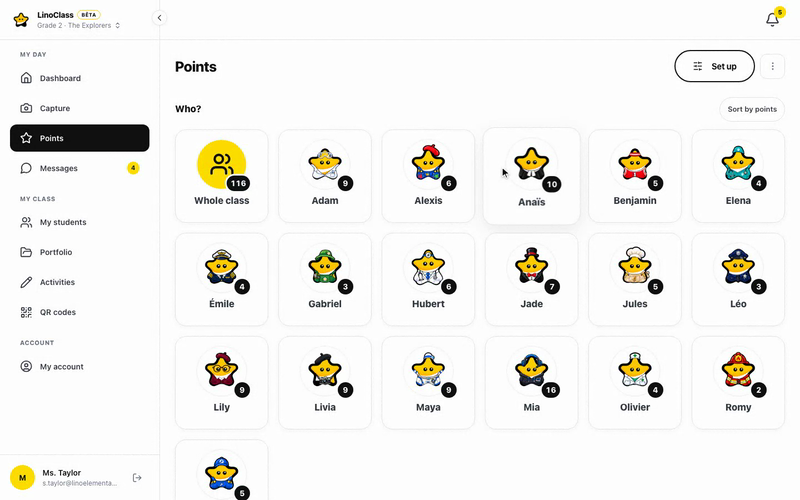
Class challenges and privileges: your list, your values
Grade 3 students negotiate. A challenge called Independent work finished at 2 points and a privilege called Teacher's helper for the day at 25 points beat an argument. You name both, set the values, and the class does the rest.
- Points to one student, a few or the whole class, in two taps
- Privilege trades in one tap; the history is kept
- Reset by term, without losing anything

The student manages their balance
At eight, they can count and they can wait. The student sees their points, their wins and the price of what they are aiming for. Saving up for the big privilege becomes their own decision.
- My points, My wins, To trade
- The link between effort and result, visible without a speech
- Undo in one tap when you got it wrong

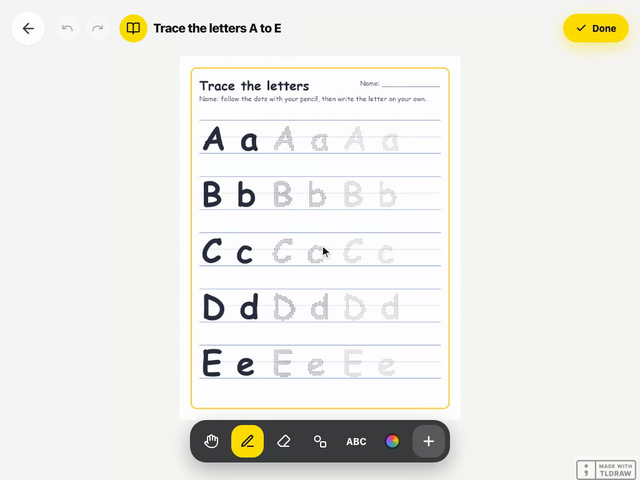
Activities handed in on the tablet, approved from one screen
A piece of writing on lined paper, a math problem on grid paper, a photo of an experiment with the explanation in audio. The student does it on the canvas and hands in with one tap, you see who submitted what, you approve, and the work enters their portfolio.
- Assign to the class, to selected students or to a group (Pro)
- Optional due date; written instructions, read out loud too
- Team work: everyone names their teammates

The class feed families actually read
Announcements, approved work, comments: one feed, one link by email, no app. By Grade 3, it is often the one school tool parents still open in the evening.
- Announcements with an attachment, now or scheduled; important ones with a notification
- Private messages with a parent, attached to the student
- Recap email on Friday

A day in class
A day in Grade 3
Four moments when LinoClass does the work while you teach.
Two points before the bell
Students scan the poster and see today's activity. Two Ready to work points for the rows settled before the bell.
Problem of the day
On grid paper. Submissions come in live on your screen; you open the ones that got stuck.
Friday is trade day
Three students take Choose my seat; another keeps saving for the big privilege.
The approved problem, and the field trip
A parent sees the approved problem and the field-trip announcement, with the form attached as a PDF.
Why this grade
What Grade 3 gets out of it, and what stays built for the little ones
LinoClass grew up in Kindergarten and Cycle One classrooms. The student screens are big buttons, icons and avatars, and they read instructions out loud: in Grade 3 that is simple, never limiting. What Grade 3 teachers come for is the points system, the tablet activities and the link with families. What we do not do: marks, report cards, attendance. You have those elsewhere, and we are not trying to replace them.
- The portfolio works in Grade 3 too.Photos, written work, approved activities, with your comments attached.
- Groups earn their keep.Reading sub-groups, project teams: an activity or an announcement to a few students (Pro).
- A combined 2-3 class?One class of 35 students or fewer stays free. The Pro plan allows several classes.
What works in Grade 3
- Points, privileges and a history you can show at a parent meeting
- Activities on lined or grid paper, handed in and approved on the tablet
- Groups for reading sub-groups and project teams (Pro)
- A combined 2-3 class inside a single LinoClass class
What LinoClass does not do
- No marks, grades or report cards
- No attendance
- No sync with your board's student information system
- Student screens built for beginning readers, which older students find simple
Privacy
These are eight-year-olds' data. We treat them that way.
Hosted in Canada, compliant with Quebec's Law 25, no ads. Parents decide what can be captured of their child, and you decide what they get shown.
Hosted in Canada
Your students' photos, drawings and work live on servers in Quebec and do not leave. No out-of-country transfer for your board to assess.
Parent consent, Law 25
Each parent allows or refuses photos, video and audio for their child, separately. You see the class consent report, and the camera greys out for a child without permission.
No ads, no data resale
A teacher or a school pays, never an advertiser. We do not sell data, and there is no advertising tracker.
No passwords for children
One QR poster per class, valid all year and active during school hours only. Nothing to remember, reset or leak.
Nothing leaves without you
A photo or a piece of work reaches families only when you approve it. Family comments pass through you before they appear, too.
Deletion on request
A parent can ask for their child's data to be erased, and a teacher who leaves can download everything and then have it all deleted, within 30 days.
Frequently asked
What Grade 3 teachers ask us
Is LinoClass really made for Grade 3?
Does LinoClass do marks or report cards?
How does the points system work?
Can I assign an activity to a sub-group?
I teach a combined class. How does that work?
A points system that lasts until June, starting this week
15 minutes to create the class, name your challenges and privileges, and print the QR poster. Free for up to 35 students, no credit card.
See pricing