
Points that mean something, and a class that works toward them.
In Grade 2, students understand a rule and remember it. LinoClass gives you class challenges in two taps, privileges that points can buy, and a history nobody argues with. Families follow along without an app.
Free for up to 35 students · no credit card · 15 minutes to set up
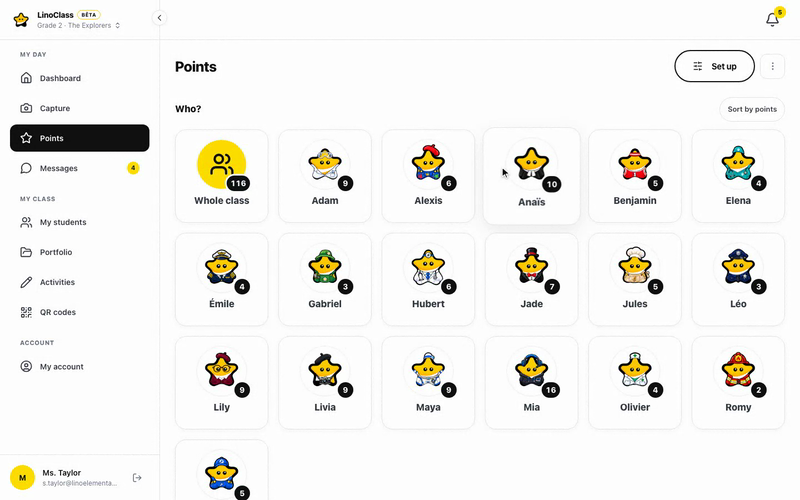
Privileges the class works toward
Pick your seat, run the board, five minutes of free drawing: you name the privileges and their cost. A student trades in points when they have enough, and you see right away what actually motivates your group.
- Class challenges: what you praise most often, with a value and a badge
- Privileges with a cost in points; the trade takes one tap
- Three challenges and three privileges come with the free plan; your own, without limit, with Pro

The student sees their points, their wins and what they can trade for
On their page, a student reads their balance, the list of their wins and the privileges within reach. The link between what they do and what they get is visible, without you repeating it.
- My points, My wins, To trade: three labels a seven-year-old can read
- Reset at the end of a term; the history is kept
- Undo a mistake in one tap

Activities that go beyond the worksheet
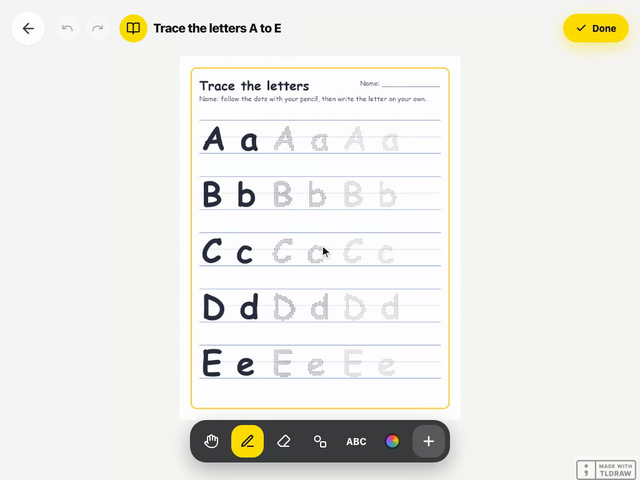
In Grade 2, a student writes a sentence, draws what happens next in the story, photographs their build and explains it. The activity is done on the canvas, as with the tracing sheet shown here, handed in with one tap, and approved from your submissions screen.
- Ready backgrounds: lined, grid, dotted, blank
- Written instructions, read out loud too; optional due date
- Team work: the student names their teammates and the work lands in each portfolio
A message to a parent, about their child
When a note in the agenda is not enough, you write to the parent directly, inside LinoClass. The conversation is attached to the student, and you decide whether parents can message you first.
- Announcements to the whole class, with an attachment, now or scheduled
- Important announcement: a push notification to families
- Parents reply with no app, through the link they got by email

A day in class
A day in Grade 2
Four moments when LinoClass does the work while you teach.
Bags emptied, homework out
Three Routine done points for everyone, in one tap. The day starts on the right foot.
What happens next
The Write what happens next activity on lined paper. Leo plays the instruction twice, then hands in his page.
Maya has 20 points
She picks Choose my seat for the week. The trade is recorded, so is her balance, and nobody argues.
A note from Leo's parent
They see his approved page in the feed and leave you a note. You approve it, it appears.
Why this grade
Grade 2, the age when a rule becomes fair
At seven, a student no longer follows the rule because you said it. They follow it because it is the same for everyone and they can see the result. A points system that lives on a whiteboard at the back of the room disappears with the eraser. In LinoClass it adds up, it can be checked, and it leads to something the student chose.
- You name the behaviours.Class challenges are your list, editable any time.
- Motivation comes from the privilege, not the number.The store is the part students look at.
- The portfolio carries on.Photos, drawings, approved activities: Grade 2 leaves a trace too.

Privacy
These are seven-year-olds' data. We treat them that way.
Hosted in Canada, compliant with Quebec's Law 25, no ads. Parents decide what can be captured of their child, and you decide what they get shown.
Hosted in Canada
Your students' photos, drawings and work live on servers in Quebec and do not leave. No out-of-country transfer for your board to assess.
Parent consent, Law 25
Each parent allows or refuses photos, video and audio for their child, separately. You see the class consent report, and the camera greys out for a child without permission.
No ads, no data resale
A teacher or a school pays, never an advertiser. We do not sell data, and there is no advertising tracker.
No passwords for children
One QR poster per class, valid all year and active during school hours only. Nothing to remember, reset or leak.
Nothing leaves without you
A photo or a piece of work reaches families only when you approve it. Family comments pass through you before they appear, too.
Deletion on request
A parent can ask for their child's data to be erased, and a teacher who leaves can download everything and then have it all deleted, within 30 days.
Frequently asked
What Grade 2 teachers ask us
How does the points system work?
Do students see each other's points?
Can we start over each term?
What part of the points system is free?
Do families need an app?
Your first three class challenges, this week
15 minutes to create the class, name three challenges and three privileges, and print the QR poster. Free for up to 35 students, no credit card.
See pricing