
The worksheet, without the pile to mark.
Grade 1 is learned by tracing: letters, numbers, your own name. LinoClass puts the worksheet on the tablet, the student does it with a finger or a stylus, and you see who handed in what without collecting a single notebook.
Free for up to 35 students · no credit card · 15 minutes to set up
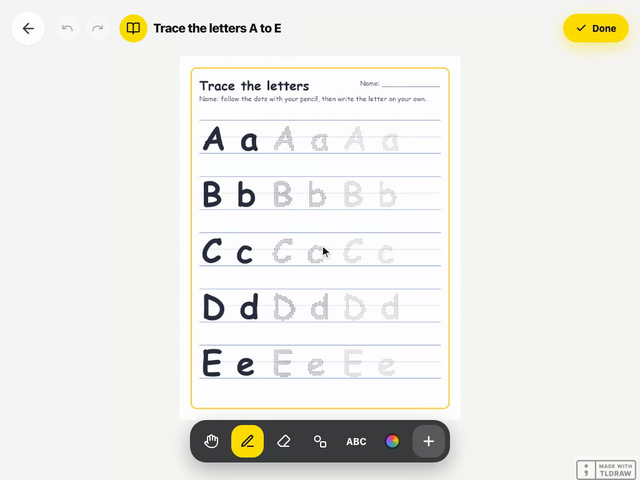
The student does the worksheet on the tablet
The student taps their name on the class tablet, no password, and the worksheet is waiting: dotted-line writing, lined paper or grid paper, with your instruction on top, to trace over with their own pencils. A button reads the instruction out loud for those who do not read yet.
- Ready-made templates: upper and lower case letters, numbers 0 to 9, my first name, shapes, patterns
- Instructions read out loud, which the student can replay as often as they like
- Pencil, marker, brush, chalk: the tools they already know

You see who handed in what
The submissions page shows every copy, pending or approved. You open it, look, approve: the work goes into the student's portfolio and their family sees it.
- Due date, submitted, pending: the whole class on one screen
- Approving is sharing: nothing reaches a family without you
- Team work: the student names their teammates and the work lands in each portfolio

The portfolio fills itself
Every approved activity, every photo, every free drawing adds itself to the student's portfolio. At the November meeting, you show the name traced in September next to today's.
- Photos, drawings and worksheets, sorted by student and by date
- Teacher comments stay attached to the work
- Download the whole portfolio at any time

Families follow along, with no app
The class feed gathers announcements, approved work and comments. Families reach it through an email link, with no account and no app, and a recap email arrives on Friday.
- Announcements with a photo, PDF or document attached, published now or scheduled
- Private messages with a parent, about their child
- Reactions and comments from families, which you approve before they show

A day in class
A day in Grade 1
Four moments when LinoClass does the work while you teach.
Today's activity is waiting
Students scan the class poster. On each home screen: today's activity, with an instruction they can listen to.
Lower case letters, on the tablet
The Trace the lower case letters worksheet. You circulate; the submissions screen updates as students finish.
Three teams tidied up on their own
Three Great teamwork points, in two taps. The class board is up to date.
The approved worksheet, the same evening
Families see the approved worksheet and the photo of the class model. On Friday, the week's recap.
Why this grade
Grade 1 is the year everything gets traced
Handwriting, first sounds, first numbers: Grade 1 is learned by hand. A worksheet on a tablet is not there to replace paper. It is there so the worksheet still exists in June, so the family has seen it, and so you never had to photocopy, collect, mark and file it.
- First points, first privileges.Three class challenges and three privileges come with the free plan: enough to start a points system in Grade 1 without having to manage one.
- The portfolio tells the year.From the name traced in September to the sentence written in June, with the photos in between.
- Free to start.Up to 35 students and 50 activities of your own. Multi-page worksheets, video and audio are part of the Pro plan.

Privacy
These are six-year-olds' data. We treat them that way.
Hosted in Canada, compliant with Quebec's Law 25, no ads. Parents decide what can be captured of their child, and you decide what they get shown.
Hosted in Canada
Your students' photos, drawings and work live on servers in Quebec and do not leave. No out-of-country transfer for your board to assess.
Parent consent, Law 25
Each parent allows or refuses photos, video and audio for their child, separately. You see the class consent report, and the camera greys out for a child without permission.
No ads, no data resale
A teacher or a school pays, never an advertiser. We do not sell data, and there is no advertising tracker.
No passwords for children
One QR poster per class, valid all year and active during school hours only. Nothing to remember, reset or leak.
Nothing leaves without you
A photo or a piece of work reaches families only when you approve it. Family comments pass through you before they appear, too.
Deletion on request
A parent can ask for their child's data to be erased, and a teacher who leaves can download everything and then have it all deleted, within 30 days.
Frequently asked
What Grade 1 teachers ask us
Can I put my own worksheets in LinoClass?
How does a student hand in work?
Do I need an iPad for every student?
Can I assign an activity to only a few students?
What is free in Grade 1?
Your first worksheet on the tablet, this week
15 minutes to create the class, print the QR poster and assign a tracing template. Free for up to 35 students, no credit card.
How to print the class QR code: the guide